
Windows 11 Folder Color Changer offers two licenses: a freeware version, and a fully licensed version.
The freeware version of Windows 11 Folder Color Changer is 100% free. The freeware version is, however, feature limited and does not include any support. Read more in the End User License Agreement.
What does “feature limited” mean?
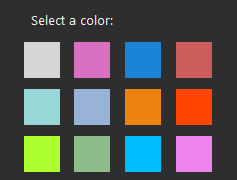
The freeware version includes these 12 colors:
Do I have to pay a license fee?
No. If you are happy with the above 12 colors and don’t intend to use overlay icons, inset icons, the advanced color mixer, or folder covers, then you can use Windows 11 Folder Color Changer free forever. There is no time limit. Except for the friendly reminders within the app there are no other notifications, and we won’t reach out to you or otherwise ‘nag’ you to purchase a license.
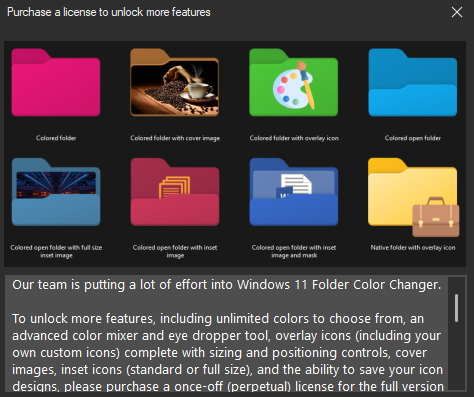
What does the “reminder” look like and when will I see it?
We’ll show an unintrusive reminder when you try to use any of the extra features as a free user, such as overlay icons, the advanced color mixer, or folder covers.
What is the license fee?
The license fee is currently $6.
What do I get for the license fee?
Unlimited colors to choose from, overlay icons, the advanced color mixer, folder covers, 5 concurrent installs, limited free e-mail support, and you’ll be supporting a good cause. 🙂
How many installs do I get for the license fee?
You get 5 concurrent (active) installs of Windows 11 Folder Color Changer. How you use the 5 concurrent installs is entirely up to you. To provide for unforeseen circumstances, you get one additional installation per year using the product key as of the anniversary of the date the product key was first issued.
Is this a subscription license?
No, it’s a perpetual license. See above.
So what do you mean by “you get one additional installation per year using the product key as of the anniversary of the date the product key was first issued”? That sounds like a subscription.
No, it’s not a subscription. It means that under normal circumstances, the license will not permit you to unlock more than 5 concurrent copies of the app, ever. However, once you reach 5 installs, if you reach the license aniversary date, we’ll permit you to unlock one new install of the app.
Can I share my product key with others to use one of my 5 installs?
Your product key is for your own, reasonable, fair use. This includes your household and work PCs (including immediate family members). We allow 5 installs to make things easier for you as a licensed user, not to take advantage of us. Your own, reasonable, fair use does not include sharing your product key with friends, colleagues or extended family (they need to obtain their own licenses).
What happens if my computer is stolen?
You have 5 concurrent installs, so unless you’ve exhausted your 5 installs, you can unlock a new install with your existing product key. If, however, you’ve exhausted your 5 installs, e-mail our team at support@delitech.co.za with a copy of your police report within 90 days of such event, and we’ll assist you further.
What happens if I have to reset my computer or reinstall Windows?
You have 5 concurrent installs, so unless you’ve exhauted your 5 installs, you can unlock a new install with your existing product key. If, however, you’ve exhausted your 5 installs, you will unfortunately need to purchase a new license.
Can I use Windows 11 Folder Color Changer on another computer?
Yes, you can install and unlock up to 5 concurrent copies of the app. If you need more than 5 concurrent installs, however, you will need to purchase another license.
Can I use Windows 11 Folder Color Changer within another user profile on the same computer?
Yes, you can install and unlock up to 5 concurrent copies of the app. If you need more than 5 concurrent installs, however, you will need to purchase another license.
How do I purchase a license / unlock all the features?
Refer to our licensing guidelines here.